If the SIM card linked to your GCash got lost, stolen, or expired, here are some steps you need to follow to continue using the e-wallet service. GCash SIM Card Lost or Stolen: What to Do Follow these steps if you've lost your SIM card or phone with your GCash-registered account. Step 1: Report immediately via GCash's Gigi Chat Support. Go to https://help.gcash.com and click on the "Chat with Gigi" button at the lower right of your screen. Provide Gigi with the required information, such as your GCash-registered email and 11-digit mobile number. When asked about your concern, type "I lost my SIM/phone." GCash's customer support will temporarily suspend your account to keep your funds safe. Please take note of the 8-digit reference number that the customer service agent will endorse, as this will be asked when requesting to lift the suspension. Step 2: Contact your telco provider to get a new SIM card with the same number. Here are the SIM replacement...
Dapatkan link
Facebook
X
Pinterest
Email
Aplikasi Lainnya
Mobile Legends 515 ALLSTAR Event: dates, free skins, rewards
Dapatkan link
Facebook
X
Pinterest
Email
Aplikasi Lainnya
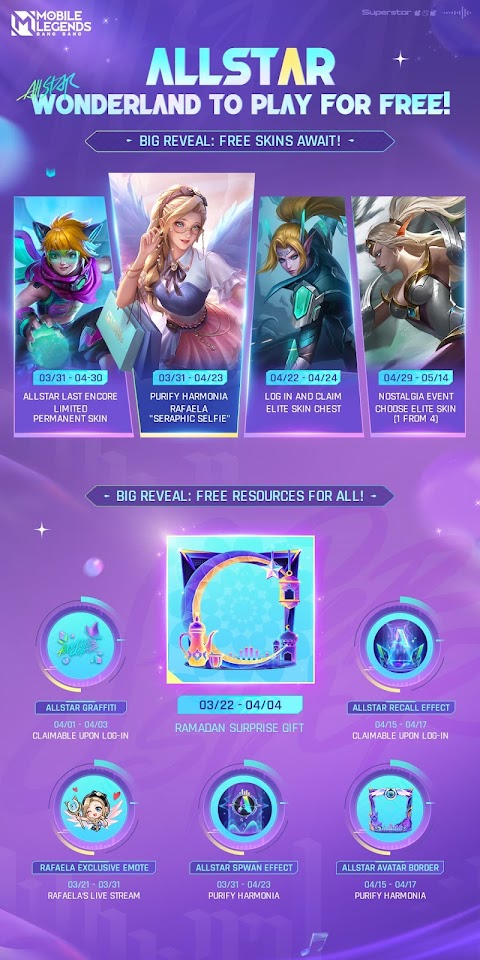
Mobile Legends 515 ALLSTAR Event brings rewards, free skins, four new exclusive skins, a new map, and special offers, among others. The game's annual event will also feature the first collab with the K-pop group ITZY for the music festival. The MLBB 515 Event 2023 will run from March 22 to April 30. Check out below for more details.
How to get free skins in MLBB 515 ALLSTAR event 2023?
Here are the release dates of all the activities where players can acquire free skins during the MLBB 515 ALLSTAR event:
ALLSTAR Last Encore (Collect tokens and exchange for permanent skin) – March 31 to April 30, 2023
Purify Harmonia (Get Rafaela "Seraphic Selfie" For Free) – March 31 to April 23, 2023
Login and Claim Elite Skin Chest – April 22 to 25, 2023
Nostalgia Event (Choose One of Four Elite Skins) – April 29 to May 14, 2023
MLBB 515 ALLSTAR Event Free Rewards
Besides the free skins, Mobile Legends players can also claim various in-game accessories during specific days in the 515 ALLSTAR event, including:
ALLSTAR Graffiti (Upon Login) – April 1 to 3, 2023
Ramadan Surprise Gift (Avatar Border) – March 22 to April 4, 2023
ALLSTAR Recall Effect (Upon Login) – April 15 to 17, 2023
Rafaela Exclusive Emote (Rafaela's Live Stream) – March 21 to 31, 2023
ALLSTAR Spawn Effect (Purify Harmonia Event) – March 31 to April 23
ALLSTAR Avatar Border – April 4 to 17, 2023
Mobile Legends 515 ALLSTAR Exclusive Skins
Here are the four new exclusive skins that can only be obtained through the event:
Eudora "Atomic Pop"
Miya "Atomic Pop"
Rafaela "Seraphic Selfie"
Hanabi "Moonlit Ninja"
Other Activities
April Starlight (featuring Edith "Ancient Warden") – April 1 to 30, 2023
New Starlight Chest – discover more surprises
ALLSTAR Festival – April 5 to 20, 2023 (complete tasks and get tons of ALLSTAR promo diamonds for free)
Mega Sale – April 20 to 25, 2023
Moonlit Wish Draw – April 15 to May 8, 2023 (promo diamonds can be used in skin draws; players can get a chance to win Hanabi "Moonlit Ninja")
30% OFF Atomic Pop Skins – "Atomic Pop" Eudora (April 12 to May 2, 2023) and "Atomic Pop" Miya (April 5 to 25, 2023)
For updates on this year's 515 ALLSTAR event, you can visit the official Mobile Legends: Bang Bang Facebook page at www.facebook.com/MobileLegendsOnlinePH.
If the SIM card linked to your GCash got lost, stolen, or expired, here are some steps you need to follow to continue using the e-wallet service. GCash SIM Card Lost or Stolen: What to Do Follow these steps if you've lost your SIM card or phone with your GCash-registered account. Step 1: Report immediately via GCash's Gigi Chat Support. Go to https://help.gcash.com and click on the "Chat with Gigi" button at the lower right of your screen. Provide Gigi with the required information, such as your GCash-registered email and 11-digit mobile number. When asked about your concern, type "I lost my SIM/phone." GCash's customer support will temporarily suspend your account to keep your funds safe. Please take note of the 8-digit reference number that the customer service agent will endorse, as this will be asked when requesting to lift the suspension. Step 2: Contact your telco provider to get a new SIM card with the same number. Here are the SIM replacement...
Bida Fiber by Converge ICT is an affordable unlimited internet plan for only 888 Pesos per month. Check out below for more details about this cheap postpaid internet plan, including its features and how to apply. Bida Fiber Plan 888 Features Pure end-to-end fiber internet Up to 35 Mbps download speed No data cap Can connect up to 6 devices PHP 888 per month Lock-in period: 36 months or 3 years Notes: The installation fee costs PHP 1000. There's an option to pay in 12 months (PHP 100/month). The router only supports a WiFi connection. LAN ports are disabled. How to apply for Bida Fiber Plan 888? To apply, you only need 1 valid ID and complete the application form via the official Bida Fiber website ( https://bidafiber.ph ). Under the "Check Availability," enter your name, mobile number, and email address, then click Continue. If your location is serviceable, you will be able to proceed with the application. To check the status of your application, visit the Bida Fiber web...
After registering your Globe or TM SIM, you'll receive a reference code, which serves as proof of registration. While this assures that you have successfully registered your SIM, you may still want to verify or check the status of its registration due to various reasons. Maybe you want to ensure your SIM card is properly activated and registered with Globe's network, or you have multiple SIMs and want to ensure that each SIM card is active and in use. In this guide, you'll learn the various methods for verifying the registration status of your Globe or TM SIM. How to Check If Your Globe or TM SIM Card Is Registered Here are the different ways how you can check or verify if your Globe Prepaid, Globe Postpaid, or TM SIM is already registered. Method 1: Via GlobeOne App Open your GlobeOne app and log in to your account. On the homepage, check the message beside your mobile number. You will see either of the following: Unregistered - with an orange exclamation mark Registered ...




Komentar
Posting Komentar